
In a cloud-first operational model, a proactive security posture is the bedrock of a resilient business. As organizations accelerate the migration of critical workloads to Microsoft Azure, understanding and implementing robust security measures is no longer optional-it's essential for survival. Simple misconfigurations, identity vulnerabilities, and network oversights can quickly lead to devastating data breaches, costly compliance failures, and significant reputational damage. Mastering a strong security framework is paramount to safeguarding your digital assets against an ever-present threat landscape.
This article cuts through the noise to deliver a comprehensive roundup of the top 10 Azure security best practices you need to implement now. We will move beyond generic advice to provide specific, actionable steps and practical implementation details for each critical area. Readers will learn how to properly configure identity and access management, fortify network defenses, protect sensitive data, and maintain continuous oversight through advanced monitoring and governance.
Each section is designed to be a clear, concise guide, helping you build a formidable defense for your Azure environment. For developers and IT professionals, especially those pursuing certifications like the AZ-204, mastering these principles is non-negotiable. This listicle provides the foundational knowledge required to not only pass exams but also to effectively secure real-world applications and infrastructure. We will cover critical tools and concepts, including:
- Securing identities with MFA and Conditional Access.
- Enforcing least privilege with Role-Based Access Control (RBAC).
- Protecting secrets with Azure Key Vault.
- Implementing network security with NSGs and Azure Firewall.
- Maintaining governance with Azure Policy.
By following these guidelines, you can ensure your data and applications remain protected, compliant, and resilient.
1. Enable Multi-Factor Authentication (MFA)
Relying on passwords alone is no longer a viable security strategy. Multi-Factor Authentication (MFA) is a foundational element of modern identity and access management and one of the most critical Azure security best practices you can implement. It adds a crucial layer of defense by requiring users to present two or more verification factors before granting access. This simple step can thwart the vast majority of identity-based attacks.
Even if an attacker compromises a user's password, they still cannot access your resources without the second factor, such as a code from an authenticator app, a fingerprint scan, or a physical security key. This layered approach moves security beyond a single point of failure, dramatically enhancing your defense against credential theft and unauthorized access.
Why MFA is Non-Negotiable
Implementing MFA is the single most effective action you can take to secure your Azure environment. It directly addresses the risk of compromised credentials, which are a primary vector for cyberattacks. Microsoft's own data underscores its importance, showing that enabling MFA blocks an overwhelming percentage of automated and targeted attacks. For roles with elevated privileges, like Global Administrators, MFA should be considered mandatory and non-negotiable.
The following infographic highlights the powerful impact and flexibility of implementing MFA in your Azure environment.
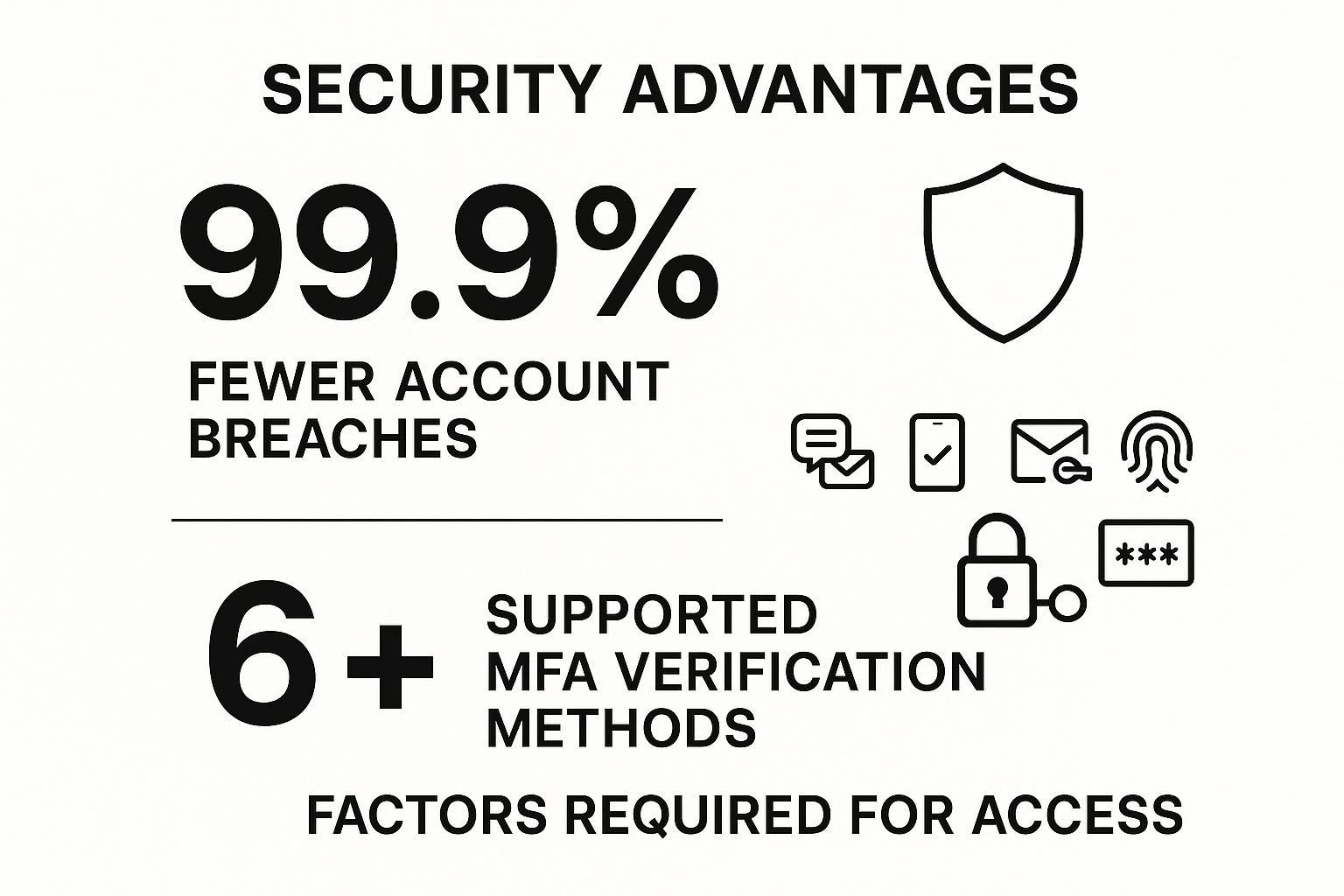
This data powerfully illustrates that MFA is not just a theoretical benefit; it delivers a near-total reduction in account compromise risk while offering multiple verification options to fit user needs.
Actionable Implementation Steps
To effectively deploy MFA, start with a targeted rollout and leverage Azure's powerful policy tools for enforcement.
- Prioritize High-Impact Accounts: Begin your MFA rollout by targeting accounts with the highest privileges, such as Global Administrators, Subscription Owners, and other key administrative roles. Securing these accounts first provides the greatest immediate security benefit.
- Leverage Conditional Access: Use Azure AD Conditional Access policies to enforce MFA based on context. You can require MFA for all users, or you can trigger it based on specific conditions like user location, device compliance, or sign-in risk level detected by Azure AD Identity Protection.
- Offer Flexible Methods: Support multiple authentication methods to improve user experience and provide backup options. These can include the Microsoft Authenticator app (push notifications or one-time passcodes), FIDO2 security keys, SMS text messages, or voice calls.
- Monitor and Review: Regularly use the authentication methods activity dashboard in Azure AD to review MFA registration and usage. This helps you identify gaps in adoption and ensure policies are being enforced as intended.
2. Implement Role-Based Access Control (RBAC)
Granting broad, unrestricted permissions to users is a significant security risk. Role-Based Access Control (RBAC) is a fundamental Azure security best practice that enforces the principle of least privilege. It ensures that users are only given the precise permissions they need to perform their specific job functions, nothing more. This granular approach is essential for managing access at scale and minimizing your environment's attack surface.
Instead of assigning permissions directly to individual users, RBAC works by assigning them to defined roles. Users are then granted those roles, inheriting a standardized set of permissions. If a user's job changes, you simply change their role assignment, instantly revoking old permissions and granting new ones. This model drastically simplifies access management and reduces the potential for human error.
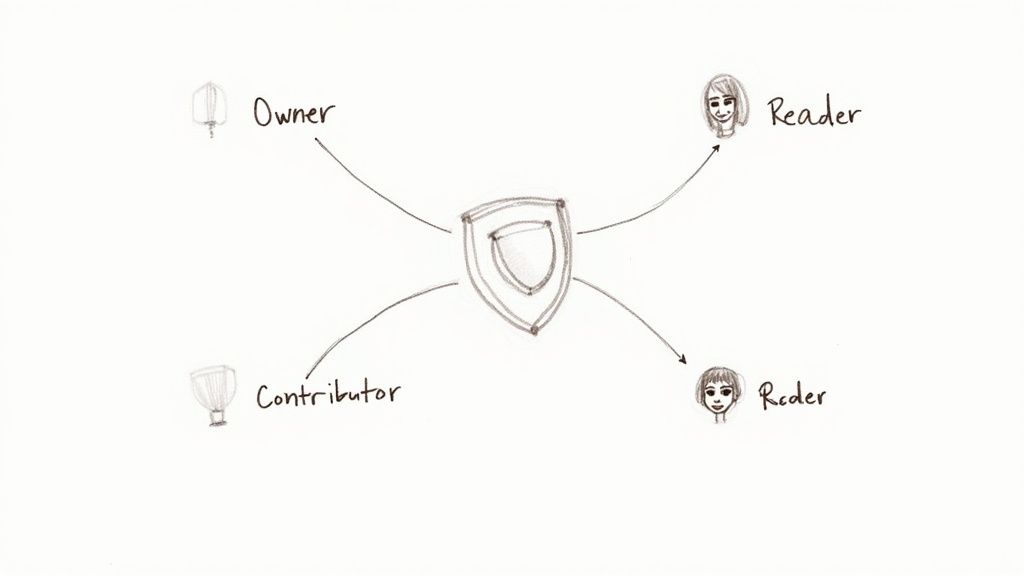
This structure ensures permissions are managed systematically, preventing the ad-hoc access rights that often lead to security vulnerabilities.
Why RBAC is a Cornerstone of Security
A well-implemented RBAC strategy is a cornerstone of the Zero Trust security model, which operates on the assumption that no user or system should be automatically trusted. By strictly controlling what actions users can perform and on which resources, you contain the potential damage from a compromised account. For instance, a user with "Reader" access cannot accidentally delete a critical production database, even if their credentials are stolen. This containment is crucial for operational resilience and is often a core requirement for regulatory compliance standards like HIPAA and GDPR.
Actionable Implementation Steps
Deploying RBAC effectively requires a thoughtful, strategic approach that balances security with operational needs. For a deeper understanding of identity synchronization, which is foundational to RBAC, you can learn more about how Azure Active Directory sync works.
- Start with Built-in Roles: Azure provides numerous built-in roles like Owner, Contributor, Reader, and many service-specific roles. Always start by evaluating these before creating custom ones, as they cover most common scenarios and are maintained by Microsoft.
- Create Custom Roles Sparingly: When built-in roles are too permissive, create custom roles with tailored permission sets. This is ideal for specialized tasks, such as granting a CI/CD service principal permission to deploy to a specific App Service but not to modify network settings.
- Regularly Audit Assignments: Permissions should not be permanent. Routinely audit role assignments, especially for high-privilege roles. Use Azure AD access reviews to automate the process of recertifying who has access to what, ensuring that permissions remain current.
- Use Azure AD Privileged Identity Management (PIM): For the most critical roles (e.g., Global Administrator, Subscription Owner), use PIM to provide just-in-time (JIT) access. This requires users to request and justify temporary elevation into a role, which is then logged and can require approval, significantly reducing the risk of standing administrative privileges.
3. Enable Azure Security Center and Microsoft Defender for Cloud
Microsoft Defender for Cloud, the evolution of Azure Security Center, serves as your central hub for security management and advanced threat protection across Azure and hybrid cloud workloads. It acts as a comprehensive Cloud Security Posture Management (CSPM) and Cloud Workload Protection Platform (CWPP) solution. This tool continuously assesses your environment, provides actionable security recommendations, and uses advanced analytics to detect and alert you to emerging threats.
Implementing Defender for Cloud is a fundamental step in establishing robust Azure security best practices, giving you a unified view of your security state. It automatically discovers and assesses your resources against security benchmarks, helping you identify and remediate vulnerabilities before they can be exploited. This proactive approach hardens your entire cloud footprint, from virtual machines and databases to App Services and storage accounts.

Why Defender for Cloud is Essential
Defender for Cloud is non-negotiable because it operationalizes security at scale. Without it, you are left to manually track configurations, monitor logs, and correlate alerts across dozens of disparate services, an impossible task in a dynamic cloud environment. It provides a "Secure Score" that gamifies and quantifies your security posture, giving you a clear, measurable goal for improvement. For instance, Progressive Insurance successfully used its recommendations to improve their security posture by 40%.
This platform's strength lies in its ability to provide context-aware recommendations tailored to your specific resources and compliance needs. By centralizing security management, it bridges the gap between development, operations, and security teams, fostering a unified DevSecOps culture.
Actionable Implementation Steps
To maximize the value of Defender for Cloud, take a phased approach that focuses on assessment, policy enforcement, and continuous improvement.
- Start with the Free Tier: Enable the foundational CSPM capabilities of Defender for Cloud across all your subscriptions. This is free and provides immediate value through continuous security assessments and actionable recommendations via the Secure Score.
- Enable Enhanced Security Features: For critical workloads, enable the paid Defender plans. These unlock advanced threat protection for servers, App Service, SQL databases, and more, providing just-in-time VM access, adaptive application controls, and advanced threat detection.
- Configure Security Policies: Customize the default security policies to align with your organization's specific compliance requirements, such as PCI DSS, ISO 27001, or SOC TSP. This ensures that assessments and recommendations are relevant to your regulatory needs.
- Integrate with Microsoft Sentinel: Connect Defender for Cloud to Microsoft Sentinel to stream alerts and security data. This integration allows for advanced threat hunting, incident correlation, and automated response orchestration across your entire enterprise.
- Regularly Review and Remediate: Make reviewing the Secure Score and acting on high-priority recommendations a regular part of your security operations. Use the provided one-click remediation options where possible to quickly fix misconfigurations.
4. Use Azure Key Vault for Secrets Management
Embedding sensitive information like API keys, database connection strings, or passwords directly into application code or configuration files is a significant security risk. Azure Key Vault provides a centralized, secure repository for managing these secrets, along with encryption keys and TLS/SSL certificates. This practice is a cornerstone of modern Azure security best practices, as it decouples sensitive data from your application, reducing the attack surface and simplifying management.
By using Key Vault, your applications can retrieve credentials at runtime through a secure, authenticated, and logged process. This prevents secrets from being exposed in source control, build artifacts, or deployment pipelines. It provides hardware-level protection (optional Hardware Security Modules – FIPS 140-2 Level 2 validated) and granular access control, ensuring only authorized applications and users can access sensitive information.

Why Key Vault is Essential for DevSecOps
Integrating Key Vault into your workflow is a fundamental step towards a mature DevSecOps posture. It addresses the critical need to secure application secrets throughout the entire development lifecycle. Instead of developers managing secrets manually, which is prone to error and exposure, Key Vault centralizes control and automates access. For instance, Netflix leverages this approach to manage thousands of secrets across its vast microservices architecture, ensuring dynamic and secure credential access at scale.
This centralized management simplifies auditing and rotation policies, which are often required for compliance with standards like PCI DSS and HIPAA. For any organization building or running applications in Azure, using Key Vault is non-negotiable for robust secret management.
Actionable Implementation Steps
To effectively integrate Azure Key Vault, focus on secure access patterns and robust operational hygiene.
- Use Managed Identities: The most secure way for Azure resources (like App Services, Functions, or VMs) to access Key Vault is by using Managed Identities for Azure resources. This eliminates the need to store any credentials in your application code, as Azure handles the authentication token exchange automatically.
- Implement Key Rotation Policies: Regularly rotate your keys and secrets to limit the time window an attacker has if a secret is ever compromised. Key Vault allows you to set automated rotation policies for both keys and secrets, simplifying this critical security task.
- Enable Soft Delete and Purge Protection: Protect against accidental or malicious deletion of your secrets. Enable the "soft delete" feature, which retains deleted vaults and secrets for a configurable period (90 days by default). Additionally, enable "purge protection" to prevent the permanent deletion of secrets during the retention period.
- Monitor Access with Diagnostic Logs: Stream Key Vault diagnostic logs to Azure Monitor or a SIEM like Microsoft Sentinel. This provides a detailed audit trail of all operations, allowing you to monitor who is accessing which secrets, detect anomalous behavior, and respond to potential security incidents.
5. Configure Network Security Groups (NSGs) and Azure Firewall
Securing your network perimeter is a fundamental pillar of any robust security posture. In Azure, Network Security Groups (NSGs) and Azure Firewall are your primary tools for controlling network traffic. An NSG acts as a stateful firewall at the network interface or subnet level, filtering traffic based on source/destination IP addresses, ports, and protocols. Azure Firewall provides a more advanced, centralized, and intelligent threat protection service for your Virtual Networks.
Using these services in tandem creates a defense-in-depth strategy. NSGs provide micro-segmentation to isolate resources within a virtual network, while Azure Firewall serves as a central point for policy enforcement and advanced threat filtering for traffic entering or leaving your network. This combination is essential for implementing a comprehensive set of Azure security best practices.
Why Network Filtering is a Core Security Control
Effective network filtering is non-negotiable for protecting your Azure assets from unauthorized access and network-based attacks. NSGs allow you to enforce the principle of least privilege at the network layer, ensuring that a virtual machine only communicates over the specific ports and protocols required for its function. Azure Firewall elevates this protection by offering features like threat intelligence-based filtering, application-level rules, and centralized management across multiple subscriptions.
For example, a healthcare organization can use NSGs to strictly isolate virtual machines processing patient data, allowing access only from specific internal application servers. At the same time, they can use Azure Firewall to inspect all outbound internet traffic from their environment, blocking connections to known malicious domains and protecting against data exfiltration.
This layered approach ensures that even if one layer of defense is bypassed, another is in place to contain and mitigate the threat.
Actionable Implementation Steps
To properly configure your network defenses, focus on precise rules, regular maintenance, and comprehensive logging.
- Apply the Principle of Least Privilege: Start with a "deny all" rule as the lowest priority and then create explicit "allow" rules only for the specific traffic required. Be as granular as possible with source/destination IP ranges and port numbers.
- Use Service Tags and Application Security Groups: Instead of managing long lists of IP addresses, use Azure Service Tags (e.g.,
Sql.EastUS,Storage.WestEurope) in your NSG rules. Use Application Security Groups (ASGs) to group VMs with similar functions (e.g., "web-servers") and apply rules to the group. - Regularly Review and Clean Up Rules: Over time, NSG rule sets can become cluttered with unused or outdated rules. Schedule periodic reviews to remove unnecessary rules, which simplifies management and reduces your potential attack surface.
- Enable NSG Flow Logs: For visibility into network traffic patterns, enable NSG flow logs and send them to a Log Analytics workspace. This provides invaluable data for troubleshooting, security analysis, and compliance auditing.
6. Enable Audit Logging and Monitoring
You cannot secure what you cannot see. Comprehensive logging and monitoring are essential Azure security best practices that provide the visibility needed to detect, investigate, and respond to threats. This involves systematically collecting security and operational data from all your Azure services, analyzing it for anomalies, and setting up alerts for potential incidents. Azure Monitor, Log Analytics, and Microsoft Sentinel are the core components for building this observability.
By establishing a robust audit trail, you gain deep insights into all activities occurring within your cloud environment. This data is invaluable not only for reactive security investigations after an event but also for proactive threat hunting, identifying misconfigurations, and ensuring regulatory compliance.
Why Logging is Non-Negotiable
Without comprehensive logging, your environment is a black box. You have no way to know if an attacker has breached your defenses, when it happened, or what they accessed. Implementing thorough audit logging and monitoring transforms your security posture from reactive to proactive, enabling you to detect suspicious patterns before they escalate into major breaches. Government agencies, for example, rely on these detailed audit trails to meet stringent compliance requirements, while retail companies use them to detect fraudulent account activities.
For any organization serious about security, having a centralized and correlated view of all logs is mandatory. This visibility is the foundation upon which every other security operation, from incident response to threat intelligence, is built.
Actionable Implementation Steps
To effectively implement logging and monitoring, you must be systematic in collecting data and strategic in analyzing it.
- Enable Diagnostic Settings: The first step is to enable diagnostic settings for all critical Azure resources, such as Virtual Machines, Storage Accounts, and Key Vaults. Configure them to send logs and metrics to a centralized Log Analytics workspace. This ensures no data is missed.
- Create Custom Queries: Use Kusto Query Language (KQL) in Log Analytics to create custom queries that search for specific security scenarios relevant to your organization. For example, you can write queries to detect impossible travel scenarios, unusual data exfiltration, or brute-force login attempts.
- Set Up Automated Responses: Leverage Azure Sentinel's analytics rules and automation playbooks (powered by Logic Apps) to trigger automated responses to critical alerts. This could involve isolating a compromised virtual machine, blocking a malicious IP address at the firewall, or notifying the security team via Teams.
- Implement Log Retention Policies: Define and enforce log retention policies based on your organization's compliance needs and operational requirements. Ensure logs are stored securely and for the required duration to support forensic analysis and regulatory audits.
For those looking to automate these configurations at scale, you can explore using the Azure PowerShell module to script the enablement of diagnostic settings across your entire environment.
7. Implement Data Encryption at Rest and in Transit
Protecting data is the ultimate goal of any security strategy. Implementing robust encryption is a fundamental Azure security best practice that ensures your data remains confidential and secure, whether it is being stored on a disk (at rest) or transmitted across a network (in transit). This dual-pronged approach protects sensitive information from unauthorized access, even if underlying physical storage or network infrastructure is compromised.
Azure provides comprehensive, layered encryption mechanisms across its services. Data at rest is typically encrypted by default using service-managed keys, but you can increase control by using your own keys. For data in transit, enforcing modern protocols like TLS 1.2+ ensures that information moving between your users, applications, and Azure services is unreadable to eavesdroppers.
Why Data Encryption is a Core Security Pillar
Data encryption is a non-negotiable requirement for regulatory compliance and protecting intellectual property. It serves as a critical last line of defense. If other security controls fail and an attacker gains access to the raw data, strong encryption renders that data useless without the corresponding decryption keys. This is especially vital for healthcare, finance, and government sectors handling highly sensitive information.
For example, a financial services company can use customer-managed keys (CMK) to encrypt transactional databases, giving them full control over the key lifecycle to meet strict compliance mandates like PCI DSS. Similarly, a healthcare provider can rely on Transparent Data Encryption (TDE) for Azure SQL to protect patient records at rest, fulfilling HIPAA requirements.
Actionable Implementation Steps
To deploy a comprehensive data encryption strategy, you should enable default protections and take control where greater security is needed.
- Enable Encryption by Default: For services like Azure Storage and Azure SQL Database, server-side encryption with service-managed keys is enabled by default. Verify this setting for all new and existing resources to establish a strong security baseline.
- Use Customer-Managed Keys (CMK) for Sensitive Workloads: For enhanced control over your data's security, use CMK with Azure Key Vault. This allows you to manage the entire lifecycle of your encryption keys, including creation, rotation, and revocation, which is often a requirement for compliance.
- Enforce TLS 1.2+ for All Connections: Configure your Azure services, such as App Service and Storage Accounts, to reject connections using older, insecure protocols. Mandate the use of Transport Layer Security (TLS) 1.2 or higher for all data in transit to protect against man-in-the-middle attacks.
- Implement a Key Rotation Policy: Regularly rotate all encryption keys, including both service-managed and customer-managed keys. A consistent rotation schedule, managed through Azure Key Vault, limits the potential impact of a compromised key.
8. Use Managed Identities for Azure Resources
Managing secrets and credentials within application code is a significant security risk. Managed Identities for Azure resources provide a superior alternative by creating an automatically managed identity in Azure Active Directory (Azure AD). This powerful feature allows Azure services to authenticate to other cloud services that support Azure AD authentication without needing any credentials stored in your code, configuration files, or environment variables.
By using managed identities, you eliminate the entire lifecycle of credential management: rotation, auditing, and protection. Azure handles these tasks behind the scenes, effectively removing a common attack vector. This practice is a cornerstone of modern Azure security best practices, as it directly mitigates the risk of leaked secrets leading to unauthorized access.
Why Managed Identities are Essential
Hardcoding credentials like connection strings or API keys is a dangerous but common practice. If this code is ever exposed, such as through a public code repository, attackers gain direct access to your resources. Managed identities solve this problem at its root by providing a secure, identity-based authentication mechanism that is tied to the Azure resource itself, not to the code running on it.
This approach simplifies development and enhances security posture simultaneously. For instance, a web app can securely access Azure Key Vault to retrieve other secrets, or an Azure Function can connect to an Azure SQL Database, all without a single password or key in its deployment package.
Actionable Implementation Steps
Implementing managed identities is straightforward and can be applied to both new and existing resources. The key is to choose the right type of identity and assign permissions based on the principle of least privilege.
- Choose the Right Identity Type: Use system-assigned managed identities for resources that require a dedicated identity tied to their lifecycle (e.g., a single VM accessing a specific storage account). Use user-assigned managed identities when you need to share a single identity across multiple resources, simplifying permission management.
- Grant Least Privilege: Once an identity is enabled for a resource like a web app, go to the target resource (e.g., Azure Key Vault or Storage Account) and assign the necessary role to the managed identity. Grant only the permissions required for its function, such as "Key Vault Secrets User" or "Storage Blob Data Contributor."
- Update Your Application Code: Modify your application code to use the Azure SDKs, which are designed to seamlessly authenticate using the managed identity. Instead of providing a connection string, you instantiate the client library, and it automatically uses the managed identity of the host environment.
- Test Identity Assignments: Before deploying to production, rigorously test that the managed identity has the correct permissions in your development or staging environments. This ensures your application functions as expected without granting excessive privileges.
9. Implement Azure Policy for Governance
Maintaining control over a sprawling cloud environment is a significant challenge, but Azure Policy provides the mechanism to enforce organizational standards and assess compliance at scale. It acts as a set of guardrails, ensuring that resources deployed in your subscriptions adhere to your corporate rules, security requirements, and cost-management strategies. By defining and assigning policies, you can automatically prevent non-compliant resources from being created or flag existing ones for remediation.
This governance-as-code approach is a cornerstone of a well-architected Azure environment. It allows you to define rules, such as restricting which VM sizes can be deployed to control costs or mandating that all storage accounts must have HTTPS traffic enabled. This proactive enforcement is a critical component of a robust Azure security best practices framework, moving you from a reactive cleanup model to a preventive security posture.
Why Policy-Driven Governance is Crucial
Implementing Azure Policy is essential for maintaining security, compliance, and operational consistency across your cloud estate. It helps prevent configuration drift, where resources slowly deviate from their intended secure state over time. For organizations in regulated industries like finance or healthcare, policies can enforce specific data handling and encryption standards required for compliance audits.
For instance, a financial services firm could use Azure Policy to mandate specific resource tags for all billable services, ensuring a clear audit trail. Similarly, a government agency can enforce that all resources are only deployed to specific, authorized Azure regions. This level of automated control is impossible to achieve manually at scale and is fundamental to secure cloud operations.
Actionable Implementation Steps
To effectively leverage Azure Policy, start with a phased approach, beginning with built-in definitions and expanding to custom rules as your governance needs mature.
- Start with Built-in Policies: Azure provides a vast library of built-in policy definitions covering common security and management scenarios. Begin by exploring and assigning these policies, such as "Allowed locations" or "Require a tag on resources," before creating complex custom ones.
- Use Policy Initiatives: Group related policies into a single unit called a policy initiative (or set). For example, you can create a "HIPAA Compliance" initiative that includes policies for enabling encryption, restricting public network access, and enabling diagnostic logs. This simplifies assignment and management.
- Test with
AuditandDisabledEffects: Before using an enforcing effect likeDeny, first apply your new policy with theAuditeffect. This allows you to evaluate the impact of the policy on existing resources without blocking any actions. You can also set the enforcement mode toDisabledduring development. - Regularly Review and Update: Your governance needs will evolve. Regularly review policy compliance reports in the Azure portal and update your policies and initiatives to adapt to new services, security threats, and organizational requirements.
10. Secure Azure AD with Conditional Access
Static security policies are no longer sufficient in a dynamic cloud environment. Conditional Access is the intelligent policy engine at the heart of Azure Active Directory, acting as a powerful tool for enforcing organizational access controls. It allows you to implement automated access control decisions for apps and resources based on specific, real-time conditions. This "if-then" policy model brings together signals to make decisions and enforce organizational policies.
This granular approach moves beyond a simple allow or deny posture, enabling you to apply the right controls under the right circumstances. For instance, you can grant access but require multi-factor authentication, or you can restrict a user's session with limited permissions. This capability is a cornerstone of a Zero Trust security model and a critical Azure security best practice for modern identity management.
Why Conditional Access is Non-Negotiable
Conditional Access is the enforcement plane of your identity security strategy. It allows you to translate security requirements into automated, context-aware policies that protect your resources at scale. Instead of applying the same rules to every user in every situation, you can adapt your security posture based on real-time risk signals, user location, device health, and the sensitivity of the application being accessed.
For example, a company can block sign-ins from untrusted or high-risk geographic locations, while organizations can demand that a device be marked as compliant in Microsoft Intune before it can access sensitive SharePoint data. This intelligent, automated enforcement is vital for securing a modern, hybrid workforce.
Actionable Implementation Steps
Deploying Conditional Access policies effectively requires careful planning, testing, and a phased rollout to minimize user disruption while maximizing security impact.
- Start with Report-Only Mode: Before enforcing any new policy, deploy it in "report-only" mode. This allows you to evaluate the potential impact on users by logging the outcome of policy decisions without actually blocking access. Review the logs to fine-tune your conditions before going live.
- Define Named Locations: Configure your trusted network locations, such as your corporate office IP address ranges, as "Named Locations" in Azure AD. This allows you to create policies that can, for example, bypass MFA for users signing in from a trusted network while enforcing it everywhere else.
- Implement Gradually with Pilot Groups: Roll out new policies to a small pilot group of users first. This helps you gather feedback and identify any unforeseen issues in a controlled manner. Once you've validated the policy's behavior, you can expand it to larger groups and eventually to your entire organization.
- Integrate and Monitor: Successful implementation of this strategy is often part of a broader security initiative. Understanding how different Azure services work together is key. For a deeper look, you can learn more about Azure Active Directory integration to see how it fits into the larger cloud ecosystem.
Top 10 Azure Security Best Practices Comparison
| Feature / Solution | Implementation Complexity 🔄 | Resource Requirements ⚡ | Expected Outcomes 📊 | Ideal Use Cases 💡 | Key Advantages ⭐ |
|---|---|---|---|---|---|
| Enable Multi-Factor Authentication (MFA) | Low – straightforward setup | Moderate – user training & multiple methods | Very high – 99.9% fewer breaches | Administrative accounts, high-risk access | Strong breach reduction, multiple methods |
| Implement Role-Based Access Control (RBAC) | Medium to High – role design & upkeep | Moderate – ongoing maintenance & audits | High – minimized overprivilege | Large orgs, compliance, fine-grained permissions | Scalable, least privilege enforcement |
| Enable Azure Security Center & Defender | Medium – initial config & tuning | Moderate to High – expertise needed | High – centralized threat detection | Hybrid cloud security, compliance monitoring | Unified security posture & automated alerts |
| Use Azure Key Vault for Secrets Management | Medium – architectural changes | Low to Moderate – setup & integration | High – secure secret storage | Apps handling sensitive keys/secrets | Hardware-level security, compliance-ready |
| Configure NSGs and Azure Firewall | Medium to High – rule complexity | Moderate – monitoring and management | High – robust network security | Network segmentation, compliance requirements | Defense in depth, centralized management |
| Enable Audit Logging and Monitoring | Medium – config & log analysis | High – storage and expertise | High – full visibility & threat detection | Compliance, forensic analysis | Comprehensive monitoring, early detection |
| Implement Data Encryption at Rest and Transit | Medium – key management complexity | Low to Moderate – performance tradeoffs | High – data breach protection | Sensitive data handling, regulatory compliance | Built-in service encryption, flexible keys |
| Use Managed Identities for Azure Resources | Low to Medium – identity assignment | Low – no extra cost | High – reduced credential exposure | Secure resource access without secrets | Automatic creds rotation, seamless integration |
| Implement Azure Policy for Governance | Medium to High – policy crafting | Low to Moderate – management & testing | High – automated compliance | Governance at scale, cost control | Automated compliance, prevention of drift |
| Secure Azure AD with Conditional Access | Medium to High – complex policies | Moderate – Azure AD Premium required | High – contextual security policies | Dynamic access control, remote workforce | Risk-based access, detailed insights |
Building Your Fortress in the Cloud
Navigating the expansive landscape of Microsoft Azure requires more than just technical skill; it demands a vigilant and proactive approach to security. Throughout this guide, we've explored ten foundational Azure security best practices that form the essential blueprint for protecting your cloud infrastructure. These are not isolated recommendations but interconnected layers of a comprehensive defense-in-depth strategy. By weaving these practices into the fabric of your cloud operations, you transition from a reactive stance to a position of control and resilience.
From Theory to Tangible Security
Mastering these concepts is the first step, but true security is realized through consistent implementation. You have seen how each practice addresses a specific vulnerability vector:
- Identity and Access Management: Fortifying your primary entry points with MFA, RBAC, Managed Identities, and Conditional Access ensures that only authorized users and services can access your resources, under the right conditions.
- Network and Infrastructure Protection: Configuring Network Security Groups and Azure Firewall creates a hardened perimeter, while using Azure Key Vault isolates your most sensitive secrets from your application code, drastically reducing the risk of exposure.
- Proactive Governance and Threat Detection: Leveraging Azure Policy allows you to enforce security standards automatically across your subscriptions. This proactive governance, combined with the powerful threat detection and security posture management capabilities of Microsoft Defender for Cloud, transforms your environment from a black box into a transparent, continuously monitored ecosystem.
- Data Protection and Auditing: Implementing data encryption at rest and in transit is non-negotiable for safeguarding information. Pairing this with robust audit logging and monitoring provides the visibility needed to detect anomalies, investigate incidents, and prove compliance.
The cumulative effect of these measures is a security posture that is both robust and agile. You are not just building walls; you are creating an intelligent, self-defending fortress that can adapt to the ever-evolving threat landscape.
Your Path Forward: Continuous Improvement
Securing an Azure environment is a journey, not a destination. The initial setup is crucial, but the real work lies in the continuous cycle of review, adaptation, and improvement. Your next steps should involve a systematic approach to operationalizing these Azure security best practices.
Start by conducting a gap analysis of your current environment against the principles outlined here. Prioritize the implementation of MFA and the principle of least privilege through RBAC, as these offer the most significant immediate security gains. From there, establish a regular cadence for reviewing your Security Center recommendations, auditing access logs, and refining your Azure Policy definitions.
For professionals on a certification path, like the AZ-204, understanding how to apply these security principles is paramount. It’s not enough to know what a Network Security Group is; you must know how to configure it to effectively block malicious traffic while enabling legitimate application flow. This practical, hands-on knowledge is what separates a certified professional from a truly competent cloud engineer. Embracing these practices will not only prepare you for your exam but will equip you to build, deploy, and manage solutions that are secure by design, instilling confidence in your stakeholders and protecting your organization’s most valuable assets.
Ready to master these security concepts and accelerate your certification journey? AZ-204 Fast uses evidence-based learning techniques to help you internalize crucial topics like Azure security, ensuring you're not just memorizing facts but truly understanding how to build secure applications. Visit AZ-204 Fast to transform your study process and confidently prepare for your exam and a career in Azure development.
Leave a Reply