The MCTS Microsoft Certified credential was, for a long time, the go-to certification for IT professionals who wanted to prove they were true specialists. It wasn't about being a jack-of-all-trades; it was about demonstrating deep, hands-on mastery over a single, specific Microsoft technology, like Windows Server 2008 or SQL Server 2008.
What Was the MCTS Microsoft Certified Credential
Before the cloud really took over, the Microsoft Certified Technology Specialist (MCTS) was a huge deal in the IT world. It stood apart because it was incredibly focused. Earning an MCTS meant you’d conquered an exam on one specific Microsoft product, proving you had real-world, practical knowledge.
This laser focus was precisely what made it so valuable. If you had an MCTS, you weren't just "familiar" with a technology—you were the person who could implement, configure, and fix it. That made you incredibly attractive to employers who needed an expert to manage a critical part of their infrastructure.
The Specialist’s Badge of Honor
Think about building a house. You don't hire a general contractor to do the wiring; you hire a specialized electrician. The MCTS served the same purpose. It was a signal to the industry that you were the dedicated expert for a particular system.
The MCTS certification acted as a foundational building block for countless IT careers. It validated the core technical skills needed to master a technology, often serving as a prerequisite for higher-level certifications like the Microsoft Certified IT Professional (MCITP).
It wasn't uncommon for a single IT pro to collect multiple MCTS certifications. For example, a database administrator might hold an MCTS for SQL Server, while a systems administrator could have one for Windows Server and another for Exchange Server, showcasing a versatile yet deep skill set.
A Focus on Product-Specific Mastery
The entire MCTS program was refreshingly straightforward. It had one primary goal: prove you knew a product inside and out. Its structure was built around this principle.
- Single-Exam Focus: Most MCTS certifications required passing just one comprehensive exam tied to a specific technology version, like "MCTS: Windows 7, Configuration."
- Deep Technical Validation: These exams were tough. They were designed to test practical skills and in-depth knowledge, going far beyond textbook theory.
- Foundation for Advanced Certs: The MCTS was often the first rung on the ladder. After earning one or more, a professional could then aim for the MCITP, which certified their ability to handle a full job role, such as "Database Administrator" or "Enterprise Administrator."
For years, this model worked beautifully. It gave IT professionals a clear path to validate their skills and helped employers find the exact talent they needed. It was a system perfectly designed for a world where technology was defined by distinct, on-premises products. But as the industry shifted towards integrated cloud services, it became clear that a new approach to certification was needed, paving the way for the next chapter in Microsoft's program.
Why Microsoft Shifted from MCTS to Role-Based Certifications
The tech world is in a constant state of flux. To stay relevant, the certifications that prove our skills have to keep up. Microsoft’s move away from the product-focused MCTS Microsoft Certified credential wasn't just a rebranding exercise; it was a direct reaction to a massive shift in how businesses operate, driven almost entirely by the rise of cloud computing and Microsoft Azure.
Think about how things used to be. Most companies ran everything on their own servers, tucked away in a data center. An IT job often meant being a deep expert in a single product, like SQL Server or Windows Server. The MCTS was perfect for that world. But as businesses migrated to the cloud, the game changed completely.
From Specialist Mechanic to Pit Crew Chief
The old MCTS model was like getting certified as a specialist mechanic—an expert on a car's engine or its transmission. That was incredibly valuable when the technology was more siloed.
But today's cloud environment is more like a modern Formula 1 car. It’s an intricate system where everything has to work in perfect harmony. You still need those specialists, of course, but you absolutely need a pit crew chief who understands how the engine, aerodynamics, fuel system, and tires all contribute to winning the race.
This is exactly what happened to IT jobs. New roles like "Solutions Architect" and "DevOps Engineer" emerged, requiring professionals who could see the bigger picture. These are the pit crew chiefs of the tech world, responsible for designing and managing complex systems by integrating multiple services—computing, storage, networking, and security. Microsoft saw this happening and knew its certification program had to evolve to match what the industry actually needed.
Aligning Certs with Real-World Job Roles
This wasn't an overnight switch. For a while, many of us used MCTS as a stepping stone into cloud roles because it’s what we had. But as cloud technology matured, Microsoft began a deliberate phase-out of the MCTS brand, especially between 2018 and 2020. It was replaced by a new generation of role-based certifications, like the Microsoft Certified: Azure Developer Associate, which mapped directly to the jobs people were actually being hired for. You can explore more about the evolution of Azure certifications and their career roadmaps to see this transition in action.
The new philosophy was simple but brilliant: stop certifying knowledge of a single product and start certifying the skills required for a specific job. This was a win-win, making it easier for professionals to focus their training and for employers to find the right people.
Instead of just proving you know a particular service, the new structure validates your ability to perform in a role. The Azure Administrator Associate certification, for example, shows an employer that you can manage an entire Azure environment, not just that you know how to spin up a virtual machine. This role-based approach gives a much clearer, more practical signal of what someone can actually do in a modern IT department.
Finding Your Modern MCTS Equivalent in Azure
If your career was built on the foundation of an MCTS Microsoft Certified credential, you might be looking at the modern cloud landscape and wondering where you fit. The great news is that your expertise is more relevant than ever. It just needs a modern translation. Microsoft's certification program has evolved from being product-focused to role-based, which means your path forward is now directly tied to real-world job functions in Azure.
Think of it like this: your old MCTS was a certification for a specific, powerful tool, like a specialized saw. The new Azure certifications are for the role that wields those tools, like a master woodworker. Your fundamental knowledge is still the bedrock, but now you’re proving you can use it to construct entire, complex solutions in the cloud.
The MCTS program was known for its direct approach—pass one deep-dive exam, and you proved your mastery of a specific technology.
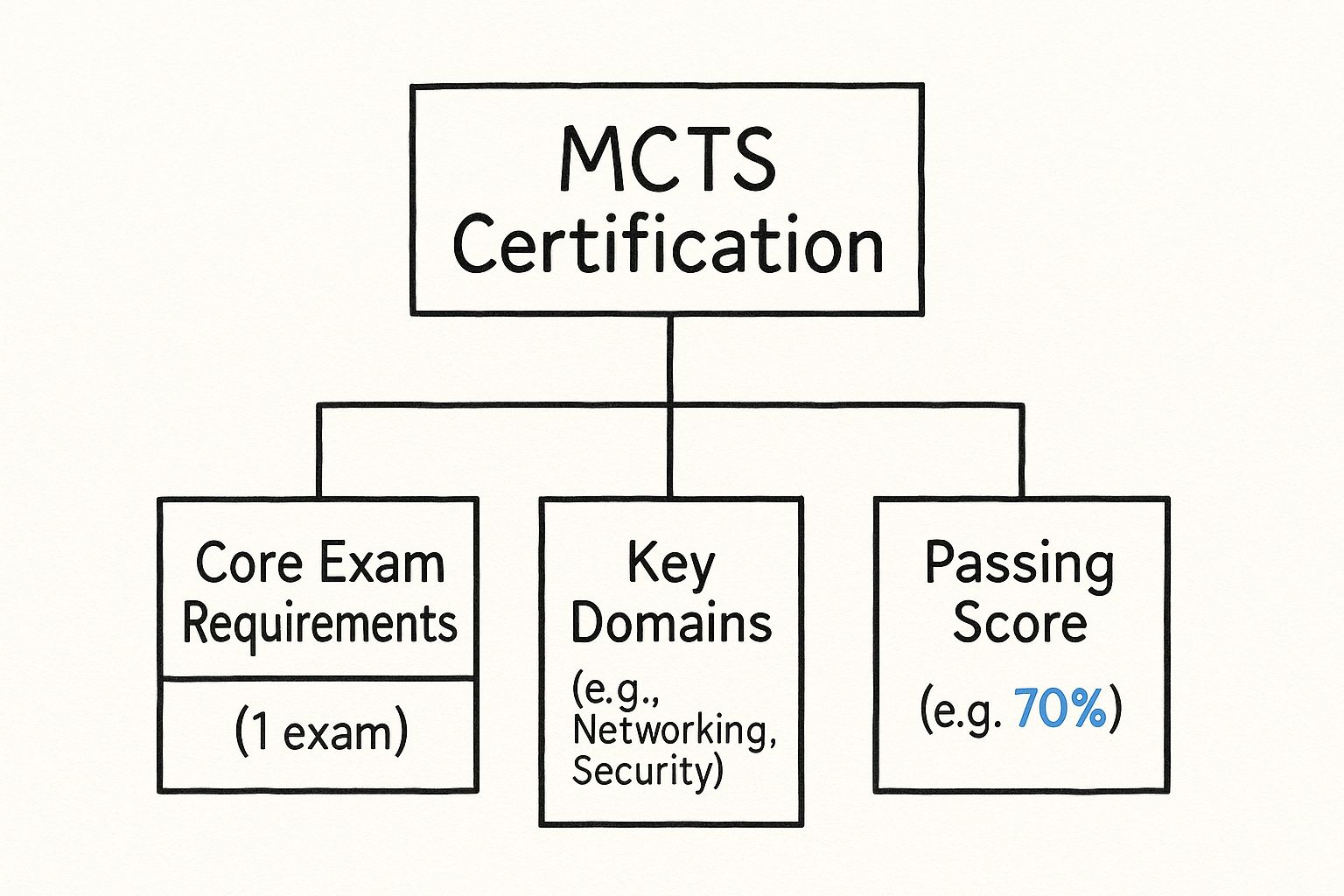
This structure made it clear what you knew. Now, the goal is to map that focused knowledge to a broader, role-based certification in Azure.
Matching Your Skills to Modern Azure Roles
The key is to connect your past specialization to a current Azure job role. Instead of dozens of individual product exams, Microsoft has created clear, consolidated certification tracks that mirror the most sought-after cloud positions. Each path is designed to validate the specific combination of skills you need to excel in that function.
Here's a look at the most common transition paths:
-
Azure Administrator Associate: If you spent years managing Windows Server, Exchange, or other on-premises infrastructure, this is your most natural starting point. The focus here is on the day-to-day work of implementing, managing, and monitoring an organization's Azure environment—from virtual networks and storage to identity and governance.
-
Azure Solutions Architect Expert: For those who designed complex on-premise systems, this expert-level certification is the logical next step. It’s all about the big picture, validating your ability to design and implement robust, secure, and scalable solutions on Azure.
To better illustrate this shift, the table below maps some common MCTS focus areas to their modern Azure counterparts.
MCTS Legacy Skills vs. Modern Azure Certification Paths
| Legacy MCTS Focus Area | Modern Azure Certification Path | Key Validated Skills |
|---|---|---|
| Windows Server Administration | Azure Administrator Associate | Implementing and managing Azure infrastructure, virtual networking, storage, identity, and monitoring. |
| SQL Server Implementation | Azure Data Engineer Associate | Designing and implementing data storage, data processing, data security, and monitoring data solutions. |
| .NET Framework Development | Azure Developer Associate | Developing, deploying, and debugging cloud-native applications and services on Azure. |
| Exchange Server / Active Directory | Azure Security Engineer Associate | Implementing platform protection, managing identity and access, and securing data and applications. |
This table shows how the core competencies you developed for your MCTS directly feed into today's in-demand Azure roles. The underlying principles are the same; the platform has just changed.
The Developer and Security Pathways
Beyond administration and architecture, developers and security specialists also have dedicated tracks that build directly on MCTS-era skills.
For example, the Microsoft Certified: Azure Developer Associate has become a cornerstone credential for anyone building modern cloud applications. The exam heavily weights skills like implementing compute solutions (25–30%) and connecting to Azure services (20–25%). You can dive into the full list of required skills for the Azure Developer exam on Microsoft's official learning site.
Choosing the right path isn't about discarding old knowledge. It's about augmenting it with cloud-native principles and proving you can apply your expertise in an Azure context.
Finally, if your MCTS was in network security or identity management, the Azure Security Engineer Associate path is a perfect fit. This certification proves you can implement robust security controls, protect data, and manage identity and access across cloud and hybrid environments. Each of these role-based certifications offers a clear, valuable evolution for your hard-earned MCTS expertise.
The Career Impact of Modern Azure Certifications

Moving on from a legacy credential like the MCTS Microsoft Certified to a modern Azure certification is more than just a resume update. It's a genuine career investment. In today's IT world, an Azure certification isn't just another piece of paper; it’s a clear signal to employers that you have the hands-on skills to work with the cloud technologies businesses rely on right now.
This kind of verified expertise gives you a real edge. It can be the one thing that pushes your resume to the top of the stack or gives you the confidence to ask for a better salary. It tells a hiring manager you can hit the ground running and start adding value immediately, which is exactly what they want to see.
Turning Certification into Real-World Opportunity
Cloud computing has absolutely exploded, and with it, the demand for people who know what they're doing. You just have to look at Azure's own growth to see the trend. Between 2020 and 2021, Microsoft Azure's revenue shot up by 50% year over year. Some data even showed a 200% jump in job postings specifically asking for Azure skills during that same period. If you want to dig deeper, you can explore more about the growth of Azure certifications and its impact on the job market.
So, how does this actually help you? Let’s look at a couple of common scenarios.
- Climbing the Ladder: Imagine an IT admin who's great with on-prem servers. They go out and earn the Azure Administrator Associate certification. Suddenly, they're not just the "server guy"—they're the perfect person to lead the company's big cloud migration project. That’s a promotion waiting to happen.
- Getting a New Gig: Think of a .NET developer who earns the Azure Developer Associate certification. When recruiters are scanning hundreds of profiles, that certification makes them stand out. They're no longer just a developer; they're a developer with proven cloud expertise.
In a crowded job market, an Azure certification is your proof. It doesn't just say you know about Azure; it proves you can actually do things on the platform. That's what gets you hired.
Better Pay and a More Secure Future
The perks don't stop once you've landed the job. They have a lasting impact on your salary and career stability. Because certified professionals are in high demand but short supply, they can—and do—command higher salaries. The investment in getting certified often pays for itself pretty quickly with your first new paycheck.
Beyond the money, an Azure certification offers a solid foundation for your career. Companies are moving to the cloud, not away from it. The need for people who can manage, secure, and build on cloud platforms is only going to grow. By keeping your skills sharp and validated, you make yourself an indispensable part of technology's future.
Your Game Plan for Passing a Microsoft Exam
Getting a modern Microsoft certification is a huge career booster, just like the MCTS Microsoft Certified credential was back in its day. But let's be honest, when you first download the exam objectives, it can feel like you're staring at the base of a mountain. Don't get overwhelmed. The secret is having a solid plan and breaking that climb into small, manageable steps.
Success isn’t about cramming the night before. It’s about building real, durable knowledge. The most effective way to do this is to create a study routine that actually fits your life. That means carving out dedicated time, even if it's just 30-45 minutes a day. Consistency will beat long, exhausting study marathons every single time.
The real goal here isn't just to pass a test. It’s to build practical, on-the-job skills. The certification is simply the official stamp that proves you know your stuff.
To get that deep understanding, you need a strategy built for retention, not just temporary memorization. This is where a few proven study methods can make all the difference.
Crafting Your Study Schedule
First things first: pick a date. Are you aiming to be exam-ready in six weeks? Or is three months more realistic? Whatever your target, work backward from that date and set achievable weekly goals. A smart plan mixes learning new material, getting your hands dirty with labs, and circling back to review what you've already covered.
Here’s what a typical week might look like:
- Monday & Tuesday: Dive into new topics using the official Microsoft Learn path for your exam.
- Wednesday & Thursday: Lab time. This is non-negotiable. Fire up an Azure free account and start building. Apply what you just learned.
- Friday: Review the week's material and hit a practice quiz to see where you're still shaky.
- Saturday: Use flashcards or review notes to quickly reinforce concepts from previous weeks.
This rhythm keeps you actively engaged with the content instead of just passively reading it.
Choosing the Right Study Tools
Microsoft gives you a ton of fantastic, free resources, and your journey should always start with Microsoft Learn. Think of it as the official, manufacturer-approved textbook for your certification—it’s mapped directly to the exam objectives.
From there, you’ll want to add tools that force you to actively recall information. Methods like spaced repetition, for instance, are scientifically proven to cement knowledge in your long-term memory. The technique is simple: you review information at increasingly longer intervals, which is perfect for locking in all those technical details. If you're tackling a developer exam, you can learn more about how to apply the spaced repetition study method for complex subjects.
Here’s a quick list of your essential study arsenal:
- Microsoft Learn: This is your primary source of truth. It's free, it's official, and it's comprehensive.
- Hands-On Labs: You absolutely have to do this. Use a free Azure trial or a sandbox to build, configure, and even break things. This is where theory turns into real skill.
- Practice Exams: These are crucial for simulating the pressure and timing of the real thing. They’re the best way to uncover those sneaky knowledge gaps you didn't even know you had.
- Community Forums & Study Groups: Find your people! Connecting with others on the same path is great for motivation and for getting new perspectives when you're stuck.
When you bring these pieces together into a structured plan, preparing for an exam stops feeling like a chore. It becomes a clear, step-by-step process that not only gets you ready for exam day but gives you the confidence that comes from genuine expertise.
Answering Your Questions About Microsoft Certifications

Even with a clear roadmap in front of you, it's natural to have questions, especially when you're looking to transition from an older credential like the MCTS Microsoft Certified to the new role-based world. Let's dig into some of the most common questions I hear from IT pros to help you move forward with confidence.
A big one is: "Does my old MCTS certification still mean anything?" The short answer is yes, but its value has changed. Since it's no longer active or renewable, it won't check the box for a job that requires a current certification. What it does do is show a potential employer your long-term dedication to the Microsoft ecosystem. It proves you have a solid technical foundation.
Think of it less like an active credential and more like valuable experience on your resume.
How Should I Transition from MCTS to a Modern Certification?
The best approach is to use your MCTS as a springboard, not a boat anchor. First, figure out which modern, role-based certification is the natural next step for you. For instance, if you hold an MCTS in Windows Server, the Azure Administrator Associate path is a logical progression.
Once you’ve picked your target, it’s time for a gap analysis. Go to the official Microsoft Learn page for your chosen exam and download the "skills outline." This is your cheat sheet. Compare what's on that list with what you already know from your MCTS days. This tells you exactly what to study.
Don't boil the ocean by trying to learn everything from scratch. Just focus on bridging the gap between your on-premises experience and the new cloud-centric skills.
The goal isn't to start over. It's to build on the solid foundation you've already established. That prior knowledge is your biggest advantage, so use it to fast-track your learning for a new role-based certification.
Another question I get a lot is about the renewal process for the new certifications. Unlike the MCTS, which was good for life, most modern, role-based certs are valid for just one year. To keep it active, you have to pass an online, unproctored assessment within the six-month window before it expires. The good news? The renewal is free and only covers recent technology updates, which is a great way to ensure your skills stay sharp.
Do I Really Need to Start with a Fundamentals Certification?
Probably not. If you're coming from an MCTS background or have years of hands-on experience, you can likely jump right into an Associate-level exam. The Fundamentals certifications (like the popular AZ-900) are fantastic for people new to the field or those in related but non-technical roles. However, they are absolutely not a mandatory stepping stone for the more advanced certifications.
Of course, the pressure of a high-stakes exam can be a real challenge for anyone, no matter how experienced. If you find that exam day nerves get the best of you, it’s worth learning how to manage that stress. You can find some great advice on how to overcome exam anxiety and perform your best when it counts. Your confidence is just as crucial as your technical skill.
Leave a Reply